
Documentation
Everything you need to build and operate a federated GraphQL API with feddi.
Agent-first platform
feddi is designed to be operated primarily through the feddi CLI. Every action is a CLI command: creating graphs, publishing schemas, managing keys, checking composition. This makes feddi a natural fit for AI coding agents like Claude Code, Cursor, or Copilot that can drive the entire workflow programmatically.
Overview
A tour of how feddi is put together: the two components that make up the system, how graphs and variants model your federated API, and how organizations group it all together.
Architecture
feddi has two components: the feddi Gateway that you self-host in your infrastructure, and the feddi Platform hosted at feddi.dev that manages schemas, composition, and analytics.
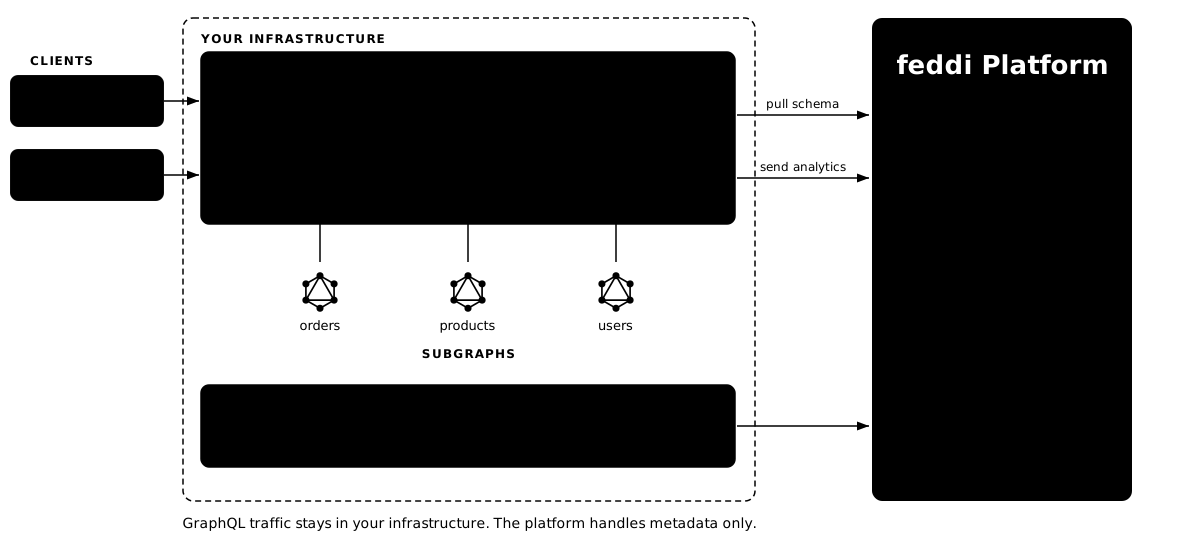
The feddi Gateway runs in your infrastructure alongside your subgraph services. It receives GraphQL requests from clients (web, mobile, AI agents), plans query execution across subgraphs, and returns unified responses. It polls the feddi Platform for schema updates and reports usage analytics.
The feddi Platform (feddi.dev) stores your subgraph schemas, composes them into a supergraph, detects breaking changes, tracks field-level usage, and serves persisted documents. You interact with it through the feddi CLI.
This separation means your data never passes through the feddi Platform: all GraphQL traffic stays within your infrastructure. The feddi Platform only handles metadata: schemas, analytics, and configuration.
Graphs & variants
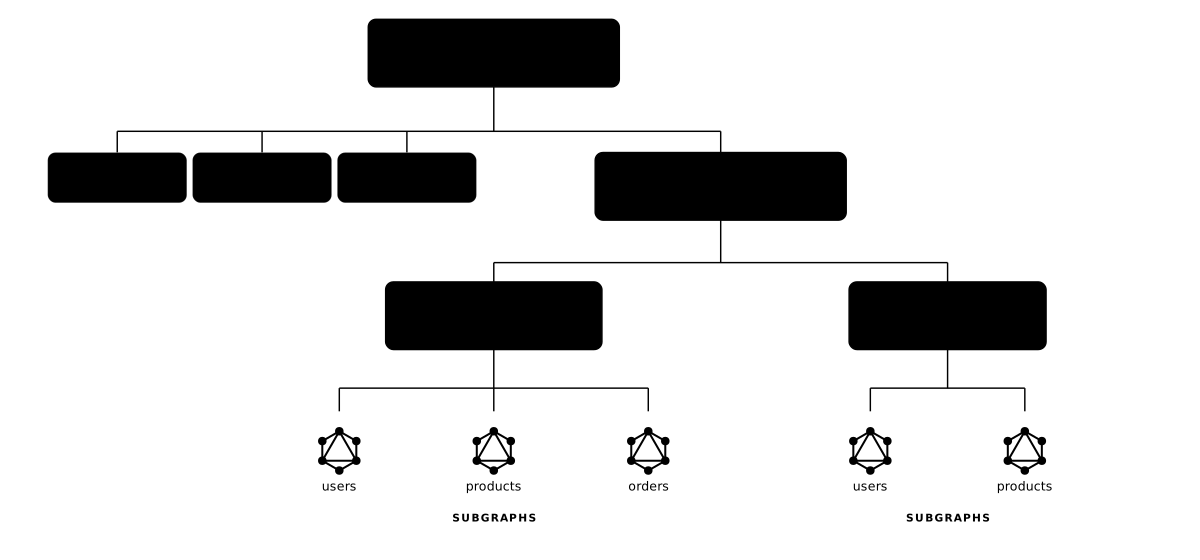
A graph represents a federated GraphQL API. Each graph belongs to an organization and contains one or more variants.
Variants are independent environments of the same graph (e.g., production, staging, development). Each variant has its own set of subgraphs, composed supergraph, API keys, and usage analytics.
This lets you test schema changes in staging before promoting to production, with fully isolated composition and gateway configuration per variant.
Users and organizations
An organization groups graphs, members, keys, and billing. A user is a single account identified by email.
Users and organizations are a many-to-many relationship: a user can belong to several organizations at once (each with its own role), and an organization has many members. Graphs, subgraphs, keys, and persisted-document lists are all owned by the organization, not the user: switching organizations changes what you can see and manage.
Signing up creates an organization
When you sign up via /platform/signup without an invitation, feddi creates a new organization and makes you its Owner. If you were instead invited to an existing org, accepting the invitation joins you to that org with the role the inviter chose, and no new organization is created in that case. A user can repeat either flow to end up in multiple organizations.
Roles
Role is set per-membership, so the same user can be Owner in one org and Member in another.
Owner: Full control including org deletion and ownership transfer.
Admin: Can invite/remove members, manage graphs, create keys.
Member: Basic read access and schema publishing.
Member limits
The Free tier supports up to 10 members per organization (including pending invitations). Upgrade to Enterprise for unlimited members.
Invitations
Owners and Admins can invite Members by email. Invitations expire after 7 days and can be resent or revoked. Invited users who don't yet have a feddi account go through a one-click accept flow that creates the account and the membership in a single step.
GraphQL Federation spec
feddi implements the open GraphQL Federation (Composite Schemas) specification maintained under the GraphQL Foundation. Subgraph schemas use the standard federation directives (@lookup, @external, @requires, @provides, @shareable, etc.) and the platform composes them into a supergraph following the spec's rules.
Because the wire format and subgraph contract are standard, feddi interoperates with any GraphQL server framework. You aren't locked into a feddi-specific runtime on the subgraph side.
Getting Started
feddi lets you compose multiple GraphQL services into a single, unified API. Each service (subgraph) owns its slice of the schema, and feddi composes them into a supergraph.
1. Sign up and create an organization
Create an account at feddi.dev/platform/signup. Each account belongs to an organization where you manage graphs, members, and API keys.
2. Install the feddi CLI
Download the feddi CLI from the Downloads page, then authenticate:
3. Create a graph and variant
feddi variant create <graph-id> "production"
4. Create and publish a subgraph
feddi subgraph publish <subgraph-id> --schema ./users.graphqls --config '{"url":"https://users.example.com/graphql"}'
feddi composes your subgraph schemas into a supergraph automatically and validates compatibility.
5. Start the feddi Gateway
Download the feddi Gateway binary from the Downloads page, create a feddi-gateway.yml with your graph variant key, and start it. The feddi Gateway polls the feddi Platform for schema updates.
feddi Gateway
The feddi Gateway is a standalone Java application that receives GraphQL requests from clients, plans query execution across your subgraphs, and returns unified responses.
It is an open-source project (Apache License 2.0) hosted at github.com/feddi-dev/feddi-gateway. The feddi Gateway works best alongside the feddi Platform (for schema polling, usage reporting, persisted-document resolution, and managed credentials), but does not depend on it: you can run the feddi Gateway with a locally-supplied supergraph SDL and no platform connection at all. See the gateway README for the standalone usage modes.
Get started
Download a prebuilt feddi Gateway distribution bundled with the feddi-platform extension from the Downloads page. The archive contains the feddi Gateway JAR, launcher scripts for Linux, macOS, and Windows, and a sample feddi-gateway.yml that you can edit in place to point at your graph variant key.
Configuration reference
All runtime configuration lives in a single feddi-gateway.yml in the working directory. A minimal platform-connected example:
enable-introspection: false
max-request-size-bytes: 2097152
logging:
dir: ./logs
extensions:
feddi:
api-url: https://feddi.dev
graph-variant-key: fddi_gvk_your_key_here
poll-interval-seconds: 600
Core gateway options (top-level keys)
port
Integer, default 8080. HTTP port for the public GraphQL endpoint (/graphql).
enable-introspection
Boolean, default true. Set to false in production to prevent schema discovery via standard GraphQL introspection.
management-port
Integer, default 9090. Port for Spring Boot actuator endpoints: /actuator/health, /actuator/info, /actuator/prometheus.
management-address
String, default 127.0.0.1. Bind address for the management server. Set to 0.0.0.0 for Docker / Kubernetes liveness and readiness probes.
max-request-size-bytes
Long, default 2097152 (2 MB). Incoming requests above this size are rejected with HTTP 413. Set to 0 to disable the limit.
logging.dir
String, default . (current working directory). Directory for the rolling feddi-gateway.log file: daily rotation, 100 MB per file, 30-day retention, 1 GB total cap.
extensions
Map, default empty. Namespace-keyed config forwarded to loaded extensions. Each installed extension picks up its own subtree (e.g. the feddi Platform extension reads extensions.feddi.*). The mere presence of a namespace here is what activates the extension's auto-configuration.
Platform extension (extensions.feddi.*)
Only active when the feddi-platform-extensions JAR is present in libs/ (the prebuilt distribution includes it).
extensions.feddi.api-url
String, required in platform mode. Base URL of the feddi Platform API, e.g. https://feddi.dev.
extensions.feddi.graph-variant-key
String, required in platform mode. Bearer token (fddi_gvk_…) that identifies the variant for schema polling and scopes usage reports.
extensions.feddi.poll-interval-seconds
Long, default 600 (10 min). How often the feddi Gateway polls the feddi Platform for supergraph updates.
extensions.feddi.usage-report-interval-seconds
Long, default 10. How often buffered per-request usage data is flushed to the feddi Platform.
extensions.feddi.persisted-documents-poll-interval-seconds
Long, default 60. How often the feddi Gateway polls for new or updated persisted documents attached to the variant.
Launcher environment variables
Consumed by the bin/feddi-gateway launcher script in the prebuilt distribution. They do not affect java -jar feddi-gateway.jar invoked directly.
FEDDI_GATEWAY_JAVA_HOME
Path to a Java 25+ installation used specifically for the feddi Gateway. Takes precedence over JAVA_HOME.
JAVA_HOME
Fallback Java installation when FEDDI_GATEWAY_JAVA_HOME is not set. Must point at Java 25 or newer.
JAVA_OPTS
Extra JVM flags appended after the launcher's defaults (-XX:+UseZGC -Xms256m -Xmx1g -XX:SoftMaxHeapSize=768m -XX:+UseStringDeduplication -XX:+AlwaysPreTouch, plus OOM handling). Use this to bump memory, e.g. JAVA_OPTS="-Xmx2g".
Subgraphs
A subgraph is a named GraphQL service in a variant. Creating a subgraph only creates that identity; it does not publish a schema or configure a gateway endpoint.
The subgraph config is JSON that is published alongside the schema SDL. Today the gateway reads the url field to decide where to send requests for that subgraph. The gateway always reads the SDL and config from the latest successful publish event, not from an independently editable subgraph setting.
Publishing schemas
The first publish attempt for a subgraph must include valid JSON config. feddi composes the submitted SDL with the latest successful SDL and config from the other subgraphs in the variant. If composition succeeds, the new supergraph and the submitted SDL/config snapshot become visible to the feddi Gateway on its next poll.
feddi subgraph publish <subgraph-id> --schema ./schema.graphqls --config '{"url":"https://users.example.com/graphql"}'
After a subgraph has a successful publish, later schema-only publishes can omit --config. In that case feddi reuses the config from the latest successful publish for that subgraph.
Updating subgraph config
To change where the gateway routes a subgraph, publish again with --config. If the SDL is unchanged, pass the same schema file with the new config. A failed publish does not replace the gateway-visible SDL or config; the gateway continues using the latest successful publish.
Schema checks
Before publishing, you can run a schema check to verify composition and detect breaking changes without persisting anything. Checks can use an explicit config, or omit it after the subgraph already has a successful publish.
feddi subgraph check <subgraph-id> --schema ./schema.graphqls
Breaking change detection
Both publish and check detect breaking changes by comparing the old and new supergraph schemas. Breaking changes (field removals, type changes, nullability changes) are rejected by default.
Override flags
Two mutually exclusive flags allow overriding:
--allow-breaking-changes
Force-accept all breaking changes regardless of usage.
--allow-breaking-changes-if-not-used
Accept breaking changes only if the affected fields have no usage in the last 30 days. Fields with recent traffic will still be rejected.
Persisted Documents
Persisted document lists (PDLs) let you pre-register GraphQL operations so clients can send a hash instead of the full query string. This reduces payload size and enables safelisting.
Create and link a PDL
feddi pdl link <variant-id> <pdl-id>
Publish documents
The SHA-256 hash is computed server-side. Publishing is idempotent: duplicate documents are ignored.
Publishing from CI
A CLI session authenticated as an Admin or Owner (via personal access token) can publish documents, but in practice you don't want your frontend-build pipeline holding Admin credentials. For that, create a persisted-document publish key: a graph-scoped credential that is allowed to publish documents to any PDL on its graph and nothing else. It cannot create/link/delete PDLs, publish subgraphs, or read schemas.
Typical flow, run once by an Owner or Admin:
The command prints a token prefixed with fddi_pdpk_. Store it as a secret in your CI (GitHub Actions secret, etc.), then in the build job:
feddi pdl publish <pdl-id> --document ./persisted-documents.graphql
Rotate by issuing a new key and feddi pd-publish-key revoke <old-key-id>.
Wire protocol
The feddi Gateway supports the Apollo APQ protocol by default. Clients send extensions.persistedQuery.sha256Hash instead of a query string. The protocol is customizable via the PersistedDocumentProtocol extension point.
Usage & Analytics
The feddi Gateway reports field-level usage data to the feddi Platform. This data powers analytics dashboards, breaking change detection, and monthly usage limits.
What's tracked
For each operation, the feddi Gateway reports its name, type (QUERY, MUTATION, or SUBSCRIPTION), operation hash, selected field coordinates, input usage coordinates, client name and version, duration, and errors. Usage commands read aggregated rollups, so very recent traffic only appears after the next rollup.
Output field usage and input usage are tracked separately. Field coordinates identify the output fields the operation selected. Input usage coordinates identify the arguments, input object fields, directives, and directive arguments the operation referenced. The two use distinct formats — see Coordinate formats.
Client breakdowns
Field, input, and operation usage summaries include a client breakdown. By default, rows are grouped by client name and version. Use --client-aggregation client-operation-name to split each client by operation name, or --client-aggregation client-operation-hash to split by operation hash. Operation-name aggregation sums different hashes for the same client and operation name; operation-hash aggregation keeps hashes separate and also returns the operation name when available.
The GraphQL API exposes the same options through the clientAggregation argument on fieldUsage, inputUsage, and operationUsage: CLIENT, CLIENT_OPERATION_NAME, or CLIENT_OPERATION_HASH.
Client breakdowns are limited to the top 100 entries by request count. Human-readable CLI output prints a truncation note when more clients exist; JSON output and GraphQL responses expose clientsTruncated: true.
Coordinate formats
Every usage record is keyed by a coordinate. Output field usage uses one format; input usage spans four kinds, selected or filtered with the --kind flag on feddi usage inputs, feddi usage, and feddi usage last-used.
Field
Format <ParentType>.<fieldName>, for example Query.user. Used by feddi usage fields, feddi usage, and feddi usage last-used.
Field Argument
Format <ParentType>.<fieldName>(<argumentName>:), for example Query.user(id:). Pass --kind field-argument.
Input Object Field
Format <InputObjectType>.<fieldName>, for example UserFilter.status. Pass --kind input-object-field.
Directive
Format @<directiveName>, for example @include. Pass --kind directive.
Directive Argument
Format @<directiveName>(<argumentName>:), for example @include(if:). Pass --kind directive-argument.
Coordinates containing (, ), or @ must be quoted in shell commands, for example 'Query.user(id:)' or '@include(if:)'.
Monthly limits (Free tier)
Each variant has a monthly limit of 1,000,000 requests and 250,000 usage buckets. When limits are reached, the feddi Gateway continues serving requests but stops reporting usage data. Upgrade to Enterprise for unlimited operations.
CLI commands
The CLI exposes three families of usage commands. Each family is summarised below with example invocations; full per-command flag references are in CLI Reference → Usage analytics.
Field usage
Reports request count, error count, average duration, last-used time, and client breakdown per field coordinate.
feddi usage fields <variant-id> --client web --operation GetUser
feddi usage fields <variant-id> --client-aggregation client-operation-name
feddi usage fields <variant-id> --from 2026-05-01T00:00:00Z --to 2026-05-14T00:00:00Z
feddi usage <variant-id> Query.user
feddi usage <variant-id> Query.user --last 7d
feddi usage <variant-id> Query.user --client-aggregation client-operation-hash
feddi usage last-used <variant-id> Query.user
Input usage
Reports which arguments, input object fields, directives, and directive arguments appeared in registered operations. feddi usage inputs filters by input coordinate kind; feddi usage and feddi usage last-used use --kind to pick which family of coordinate to look up.
feddi usage inputs <variant-id> --kind field-argument
feddi usage inputs <variant-id> --client web --operation GetUser
feddi usage inputs <variant-id> --client-aggregation client-operation-name
feddi usage <variant-id> 'Query.user(id:)' --kind field-argument
feddi usage <variant-id> UserFilter.status --kind input-object-field --last 30d
feddi usage last-used <variant-id> '@include(if:)' --kind directive-argument
Operation usage
Reports request count, error count, average duration, clients, selected fields, and input usage coordinates per operation.
feddi usage operations <variant-id> --operation-type QUERY --client web
feddi usage operations <variant-id> --client-aggregation client-operation-hash
feddi usage operations <variant-id> --min-avg-ms 100 --sort AVG_DURATION_DESC
feddi usage operation <variant-id> GetUser
feddi usage operation <variant-id> GetUser --client-aggregation client-operation-name
Keys & Authentication
Personal access tokens
PATs authenticate your CLI and API requests as your user account. Create them in Settings → Access Tokens.
Graph variant keys
Graph variant keys authenticate the feddi Gateway. They're scoped to a variant and grant access to all subgraphs within it. The feddi Gateway uses the graph variant key to poll for schema updates and report usage.
Subgraph keys
Subgraph keys are scoped to specific subgraphs within a variant. Use them in CI/CD pipelines for publishing schemas with least-privilege access.
Persisted-document publish keys
Graph-scoped keys that authorize one thing: publishing documents to any PDL belonging to the target graph. They cannot create, link, or delete PDLs, publish subgraphs, or read schemas, and are designed for frontend-build CI pipelines that need to ship a persisted-query manifest on every deploy without exposing broader privileges.
CLI Reference
Complete command reference. All commands support --json for machine-readable output.
Automatic updates
The feddi CLI checks /releases/latest/manifest.json once an hour at startup and silently upgrades itself when a newer build is available. The check fetches a small JSON (a few hundred bytes), verifies the new tarball's SHA-256 against the manifest before any filesystem write, and swaps the binary atomically. A one-line confirmation is printed to stderr after a successful update. A failed check (network timeout, checksum mismatch, missing write permission) never aborts the command you ran.
The check is automatically skipped in environments where an update would be disruptive: when CI=true, when automatic updates are explicitly disabled, and when the feddi CLI is a source build (feddi version reports dev).
To opt out explicitly:
--no-update
Flag on any command; skips the update check for that one invocation.
FEDDI_DISABLE_AUTO_UPDATE=1
Environment variable; persists across all invocations for that shell.
feddi update
Force an immediate check, bypassing the one-hour cache and the CI skip heuristic. Use this when you want to pull the latest build right now (e.g. after a known release) without waiting for the next automatic check.
Set FEDDI_DEBUG=1 to see why a check was skipped or why one failed.
Authentication
feddi auth login
Save a personal access token. Interactive by default; pass --token to skip the prompt.
Flags: --token <token>
Who: no auth required
feddi whoami
Show the currently authenticated user.
Who: any signed-in user
Graphs
feddi graph list <org-id>
List graphs in an organization.
Who: Member Admin Owner
feddi graph create <org-id> <name>
Create a graph.
Who: Admin Owner
feddi graph view <graph-id>
View graph details.
Who: Member Admin Owner
feddi graph update <graph-id> --name <new-name>
Rename a graph.
Who: Admin Owner
feddi graph delete <graph-id>
Delete a graph and all its variants.
Who: Admin Owner
Variants
feddi variant create <graph-id> <name>
Create a variant.
Flags: --endpoint <url>
Who: Admin Owner
feddi variant list <graph-id>
List variants of a graph.
Who: Member Admin Owner
feddi variant update <variant-id>
Update a variant's name or supergraph endpoint URL. At least one flag must be provided.
Flags: --name <name> · --endpoint <url>
Who: Admin Owner
feddi variant delete <variant-id>
Delete a variant.
Who: Admin Owner
Subgraphs
feddi subgraph create <variant-id> <name>
Create a named subgraph identity. Config is supplied when publishing, not at create time.
Who: Admin Owner
feddi subgraph publish <subgraph-id> --schema <file> [--config <json>]
Publish schema and endpoint configuration. First publish requires config; later publishes reuse the latest successful config when omitted. To update config, publish again with the current schema and new config.
Flags: --config · --allow-breaking-changes · --allow-breaking-changes-if-not-used
Who: Admin Owner subgraph key graph variant key
feddi subgraph check <subgraph-id> --schema <file> [--config <json>]
Check composition and breaking changes without persisting. Config is required when the subgraph has no successful publish yet; otherwise the latest successful config is reused when omitted.
Flags: --config · --allow-breaking-changes · --allow-breaking-changes-if-not-used
Who: Admin Owner subgraph key graph variant key
feddi subgraph sdl <subgraph-id>
Output the latest successfully published SDL to stdout.
Who: Member Admin Owner
feddi subgraph list <graph-id>
List subgraphs. The config column shows the latest successful publish config when available.
Who: Member Admin Owner
feddi subgraph delete <subgraph-id>
Delete a subgraph.
Who: Admin Owner
Persisted document lists
feddi pdl create <graph-id> <name>
Create a persisted document list.
Who: Admin Owner
feddi pdl list <graph-id>
List persisted document lists.
Who: Member Admin Owner
feddi pdl link <variant-id> <pdl-id>
Link a PDL to a variant.
Who: Admin Owner
feddi pdl unlink <variant-id>
Unlink the PDL from a variant.
Who: Admin Owner
feddi pdl publish <pdl-id> --document <file>
Publish a document to the list.
Flags: --client-name <name>
Who: Admin Owner pd publish key
feddi pdl documents <pdl-id>
List documents in a PDL.
Who: Member Admin Owner
feddi pdl delete <pdl-id>
Delete a persisted document list.
Who: Admin Owner
Keys
feddi graph-variant-key create <variant-id> <name> [--expires <date>]
Create a graph variant key for gateway authentication. --expires accepts yyyy-MM-dd or a full timestamp; defaults to 60 days from now.
Who: Admin Owner
feddi graph-variant-key list <graph-id>
List graph variant keys. Members can run this but get an empty list: key fields are hidden from them.
Who: Admin Owner
feddi graph-variant-key revoke <key-id>
Revoke a graph variant key.
Who: Admin Owner
feddi subgraph-key create <variant-id> <name> --subgraphs <ids> [--expires <date>]
Create a subgraph key scoped to specific subgraphs. --expires accepts yyyy-MM-dd or a full timestamp; defaults to 60 days from now.
Who: Admin Owner
feddi subgraph-key list <graph-id>
List subgraph keys. Members can run this but get an empty list: key fields are hidden from them.
Who: Admin Owner
feddi subgraph-key revoke <key-id>
Revoke a subgraph key.
Who: Admin Owner
feddi pd-publish-key create <graph-id> <name> [--expires <date>]
Create a graph-scoped persisted-document publish key. Authorizes publishing documents to any PDL on the target graph and nothing else. --expires accepts yyyy-MM-dd or a full timestamp; defaults to 60 days from now.
Who: Admin Owner
feddi pd-publish-key list <graph-id>
List PD publish keys for a graph. Members can run this but get an empty list: key fields are hidden from them.
Who: Admin Owner
feddi pd-publish-key revoke <key-id>
Revoke a PD publish key.
Who: Admin Owner
Usage analytics
All usage commands support the global --json flag. List commands support Relay-style pagination with --first, --after, --last, and --before; for list commands, --last is an item count. Coordinate detail commands use --last <duration> to restrict results to a recent window, with values like 1h, 7d, 4w, or 6mo.
Commands that include client breakdowns support --client-aggregation <client|client-operation-name|client-operation-hash>. Client breakdowns return the top 100 entries; clientsTruncated in JSON output indicates that additional client rows were omitted.
feddi usage <variant-id> <coordinate>
Show usage detail for a specific coordinate such as Query.user or Query.user(id:). Field coordinates are the default; input coordinates require --kind.
Kind: --kind <field|field-argument|input-object-field|directive|directive-argument>
Client breakdown: --client-aggregation <client|client-operation-name|client-operation-hash>
Time range: --last <duration>
Who: Member Admin Owner
feddi usage last-used <variant-id> <coordinate>
Show when a field or input coordinate was last used.
Kind: --kind <field|field-argument|input-object-field|directive|directive-argument>
Who: Member Admin Owner
feddi usage fields <variant-id>
List field usage with request counts, error counts, average duration, last-used time, and client breakdown.
Filters: --client <name> · --operation <name>
Client breakdown: --client-aggregation <client|client-operation-name|client-operation-hash>
Time range: --from <timestamp> with --to <timestamp>
Pagination: --first <n> · --after <cursor> · --last <n> · --before <cursor>
Who: Member Admin Owner
feddi usage inputs <variant-id>
List argument, input object field, directive, and directive argument usage for a variant. See Coordinate formats for the four valid input --kind values.
Filters: --kind <kind> · --client <name> · --operation <name>
Client breakdown: --client-aggregation <client|client-operation-name|client-operation-hash>
Time range: --from <timestamp> with --to <timestamp>
Pagination: --first <n> · --after <cursor> · --last <n> · --before <cursor>
Who: Member Admin Owner
feddi usage operations <variant-id>
List operation-level usage with request counts, error counts, and client breakdown.
Filters: --operation-name <name> · --operation-type <QUERY|MUTATION|SUBSCRIPTION> · --client <name> · --min-avg-ms <ms> · --max-avg-ms <ms>
Client breakdown: --client-aggregation <client|client-operation-name|client-operation-hash>
Time range: --from <timestamp> with --to <timestamp>
Sort: --sort <value> — one of REQUEST_COUNT_DESC, REQUEST_COUNT_ASC, AVG_DURATION_DESC, AVG_DURATION_ASC, ERROR_COUNT_DESC, LAST_USED_DESC
Pagination: --first <n> · --after <cursor> · --last <n> · --before <cursor>
Who: Member Admin Owner
feddi usage operation <variant-id> <operation-name>
Show usage detail for a specific operation, including selected fields, input usage coordinates, and clients.
Client breakdown: --client-aggregation <client|client-operation-name|client-operation-hash>
Who: Member Admin Owner
Organizations & members
feddi org list
List your organizations.
Who: any signed-in user
feddi org view <org-id>
View organization details.
Who: Member Admin Owner
feddi member list <org-id>
List organization members.
Flags: --first <N> · --after <cursor>
Who: Member Admin Owner
feddi member invite <org-id> <email>
Invite a member.
Flags: --role <ADMIN|MEMBER> (default: MEMBER)
Who: Admin Owner
feddi member revoke-invite <invitation-id>
Revoke a pending invitation.
Who: Admin Owner
feddi member resend-invite <invitation-id>
Resend the email for a pending invitation.
Who: Admin Owner
feddi member deactivate <membership-id>
Suspend an active member. Admins cannot deactivate other Admins or Owners.
Who: Admin Owner
feddi member reactivate <membership-id>
Restore a previously deactivated member.
Who: Admin Owner
feddi member update-role <membership-id> <role>
Change a member's role. Promoting another Member to OWNER demotes the current Owner to ADMIN.
Who: Owner
Miscellaneous
feddi version
Print the CLI version and build info.
Who: no auth required