Get feddi running in your stack
Run the JVM-native gateway, install the CLI, and connect everything to the feddi Platform — in under 15 minutes.
Before you start: you'll need a feddi account,
Java 25+ for the gateway, and curl, tar, and sed on macOS / Linux.
Download the feddi CLI for your operating system and put it on your PATH.
OS=$(uname -s|tr A-Z a-z); ARCH=$(uname -m|sed 's/x86_64/amd64/;s/aarch64/arm64/'); curl -fL "https://feddi.dev/releases/latest/cli/$OS-$ARCH" -o feddi.tar.gz
tar xzf feddi.tar.gz
sudo mv feddi /usr/local/bin/
feddi version
Get your token from feddi Platform: click your name in the top-right → Settings → create one under Personal Access Tokens. No account yet? Sign up free.
feddi auth login --token <your-token>
feddi whoami
On Windows (PowerShell): $arch = if ($env:PROCESSOR_ARCHITECTURE -eq 'AMD64') {'amd64'} else {'arm64'}; curl -fL "https://feddi.dev/releases/latest/cli/windows-$arch" -o feddi.tar.gz; tar xzf feddi.tar.gz,
then move feddi.exe to a directory on your PATH.
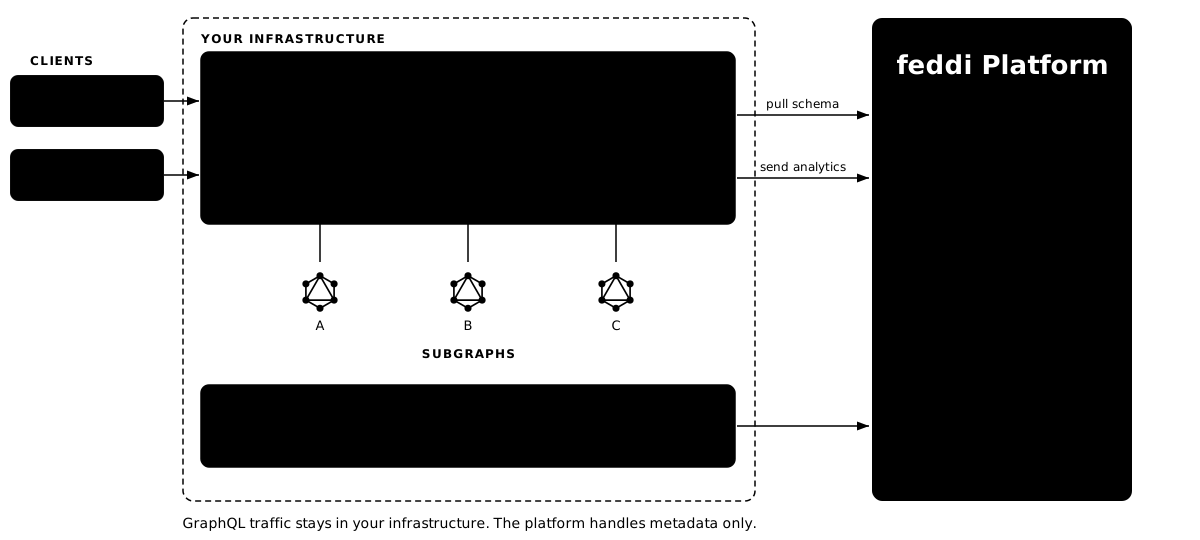
A graph represents your API. Variants let you run separate instances — for example production and staging. The gateway authenticates to feddi Platform with a graph-variant key, which you'll create at the end of this step.
# Find your organization ID
feddi org list

# Create the graph (org-id from previous command)
feddi graph create <org-id> my-graph

# Create a variant under the new graph (graph-id from previous command)
feddi variant create <graph-id> production

# Create a graph-variant key to talk with feddi Platform (variant-id from previous command)
feddi graph-variant-key create <variant-id> my-api-key
The last command prints a token starting with fddi_gvk_… — save it, you'll need it in Step 3. Each <…-id> placeholder above is the id field from the previous command's output.
The feddi Gateway is a JVM application. Unzip the distribution and start it.
curl -fL https://feddi.dev/releases/latest/gateway -o feddi-gateway.zip
unzip feddi-gateway.zip
cd feddi-gateway
cp feddi-gateway.yml.sample feddi-gateway.yml
# Add the extensions block below to feddi-gateway.yml,
# replacing the graph-variant-key with the token from Step 2.
extensions:
  feddi:
    graph-variant-key: fddi_gvk_…  # from Step 2
    poll-interval-seconds: 30      # default 600 — lower for local dev
./bin/feddi-gateway         # macOS / Linux
bin\feddi-gateway.bat       # Windows
Java 25+ is required — the launcher validates this on startup and exits with a clear error if the version is wrong.
Your GraphQL endpoint will be http://localhost:8080/graphql.
Tell feddi Platform about each subgraph in your federation. Registering two subgraphs lets you see composition in action — fields contributed by one subgraph appear on types owned by another.
# users.graphql
type Query {
  user(id: ID!): User @lookup
}

type User @key(fields: "id") {
  id: ID!
  name: String
}
# orders.graphql
type Query {
  order(id: ID!): Order @lookup
  userById(id: ID! @is(field: "id")): User @lookup
}

type Order @key(fields: "id") {
  id: ID!
  total: Float
}

type User @key(fields: "id") {
  id: ID!
  orders: [Order]
}
# Register the users subgraph (variant-id from Step 2)
feddi subgraph create <variant-id> users
feddi subgraph check <users-subgraph-id> --schema ./users.graphql --config '{"url":"http://users-service/graphql"}'
feddi subgraph publish <users-subgraph-id> --schema ./users.graphql --config '{"url":"http://users-service/graphql"}'

# Register the orders subgraph (same variant-id)
feddi subgraph create <variant-id> orders
feddi subgraph check <orders-subgraph-id> --schema ./orders.graphql --config '{"url":"http://orders-service/graphql"}'
feddi subgraph publish <orders-subgraph-id> --schema ./orders.graphql --config '{"url":"http://orders-service/graphql"}'
Run an introspection query against the gateway to confirm your supergraph composed correctly. The gateway answers this itself — no subgraph services need to be running yet.
curl -X POST http://localhost:8080/graphql \
  -H 'Content-Type: application/json' \
  -d '{"query":"{ __type(name: \"User\") { fields { name } } }"}'
Expected: {"data":{"__type":{"fields":[{"name":"id"},{"name":"name"},{"name":"orders"}]}}}.
The orders field on User is contributed by the orders subgraph — proof that composition worked.
The gateway polls feddi Platform for schema changes every poll-interval-seconds. After publishing a schema change, either wait for the next poll or restart the gateway to pick it up immediately.